

Do Blog Comments Help SEO? What Google Says About Them

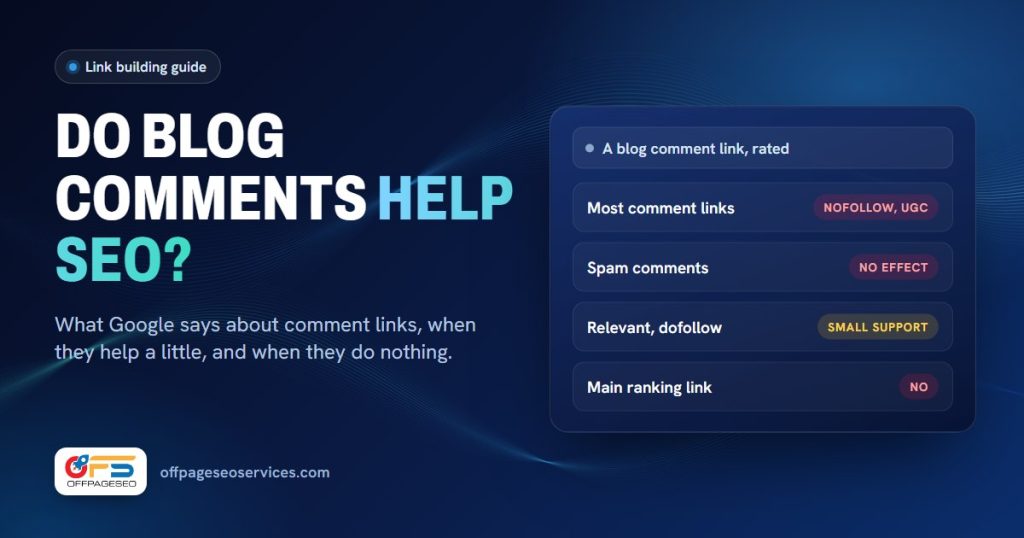
Blog comments help SEO very little on their own. Most comment links are nofollow, Google ignores spam comments, and a comment link won’t rank a page by itself. A relevant comment on a related blog can add a small, natural-looking link alongside stronger ones. That’s the most you should expect.
We sell blog comment packages, so you might expect us to oversell them. We’d rather you buy them for the right job. This guide covers what Google has said, which comment links count, and when they’re a waste of money.
Key takeaways
- Since WordPress 5.3, comment links get
rel="nofollow ugc"by default. - Google recommends marking comment links with
ugc, and treats nofollow and ugc as hints. - John Mueller of Google said spam comment links “have no effect”.
- Google’s spam policies list “Comment spam on blogs” and forum comments with optimized links.
- Use comments as support links around guest posts and niche edits, never as your main links.
Do blog comment backlinks help SEO?
A little, at best. Most comment links carry nofollow or ugc, which Google treats as a hint rather than a vote. Spammy comments are ignored. A relevant, dofollow comment on a real blog in your niche can add a small amount of support to a page that already has stronger links.
Google has been direct about spam comments. In January 2026, a site owner asked about spam links in a blog’s comments, and John Mueller replied: “These links all have no effect – they’re from spammers dropping links into comments.” That exchange was covered by Search Engine Roundtable.
He was talking about spam, not a careful comment on a relevant post. Still, it tells you how Google sees most comment links: as noise it has learned to skip.
Are blog comment links dofollow?
Most aren’t. WordPress, which runs a large share of blogs, adds rel="nofollow ugc" to links in comments and to the comment author’s URL by default. A comment link is dofollow only when the blog owner has changed that setting, usually with a plugin or theme option.
The WordPress team announced it in 2019: “Starting in WordPress 5.3, links in comments and comment author URLs will use the rel=”nofollow ugc” attribute by default.” You can read it on the WordPress core blog.
Google asks for the same thing. Its guide to qualifying outbound links says: “We recommend marking user-generated content (UGC) links, such as comments and forum posts, with the ugc value.”
Nofollow doesn’t mean zero. When Google introduced ugc in 2019, it said that “All the link attributes—sponsored, ugc, and nofollow—are treated as hints”. That’s from Google’s announcement. A hint can be used or ignored, and Google doesn’t say which.
Can blog comments hurt my site?
Spam comments can. Google’s spam policies list “Comment spam on blogs” and “Forum comments with optimized links in the post or signature” as spam. Most of the time Google just ignores those links, but a pattern of them, with keyword anchors on unrelated blogs, is the kind of thing that can lead to a manual action.
Both lines are from Google’s spam policies. The same page lists “Using automated programs or services to create links to your site” as link spam, which rules out comment bots.
Comments on your own blog matter too. Spam comments you approve sit on your page, link out to bad sites and make the page look neglected. Moderate them, or turn comments off on posts that only attract spam.
Which comment links are worth having?
A comment that adds something to the post, on a blog in your niche, on a page Google has indexed, with a link that fits the discussion. Anything else, like “great post” comments, unrelated blogs, keyword anchors or hundreds of comments at once, is either ignored or adds risk.
| Comment link | Likely value | Risk |
|---|---|---|
| Bot-posted, unrelated blogs | None | High. Google lists automated links as spam |
| “Great post” with a keyword anchor | None | Medium. It’s the comment spam Google describes |
| Nofollow or ugc, relevant blog | Small. Google may treat it as a hint | Low |
| Dofollow, relevant post, indexed page, useful comment | Small support around stronger links | Low to medium |
That last row is what our niche blog comments aim for. We write a comment that fits each post, post it by hand on DA30+ blogs in or near your niche, and use a different domain for every link. Packages are 10, 30 or 50 links for $15, $45 or $75, delivered in 4 to 8 days.
How should you use blog comments for SEO?
Treat them as support, not the plan. Build your main links with guest posts or niche edits on sites with real traffic, then add a small number of relevant comments around them. Write each comment for the people reading the post, and point the link at a page that answers their question.
- Get the main links first. A page needs links from real sites before comments can add anything. Our guide to how many backlinks you need shows how to size that.
- Comment where you’d read. Pick blogs your customers actually visit, in your topic.
- Add something. A fact, a counterpoint or a short example. If the comment would make sense without your link, it’s a good one.
- Use natural anchors. Your name, your brand or a plain URL. Exact-match keyword anchors in comments look like spam.
- Keep the numbers small. A few comments a month look like a person taking part. Hundreds look like a tool.
If you want free ways to earn links first, our list of free backlinks that still work covers the ones worth your time.
When shouldn’t you buy blog comments?
Don’t buy them as your only links, for a page with no other backlinks, or to fix a ranking drop. Skip them if you want fast movement on a competitive keyword. Comments are a cheap, small extra, and they can’t replace links from sites with real traffic.
That includes ours. Don’t order blog comments from us if:
- They’d be your only links. Start with a guest post or a niche edit, then add comments.
- You want hundreds at once. We cap packages at 50 for a reason, and we’d rather you spread them out.
- You’re trying to recover from a penalty. More low-cost links are the wrong move. Read is buying backlinks safe first.
Be clear about the rules, too. Google’s spam policies list “Exchanging money for links, or posts that contain links” as link spam, and paying someone to post comments with links falls under the same idea. Any paid link carries some risk.
Frequently asked questions
Do blog comments help SEO?
Very little on their own. Most comment links are nofollow, and Google ignores spam comments. A relevant comment on a related blog can add small support to a page that already has stronger links.
Are blog comment links dofollow?
Most aren’t. Since WordPress 5.3, comment links get rel=”nofollow ugc” by default. A comment link is dofollow only if the blog owner has changed that setting.
Does Google count nofollow comment links?
Google treats nofollow and ugc as hints, so it may use them or ignore them. It doesn’t say which, so don’t count on them for rankings.
Can blog comments hurt my site?
Spam comments can. Google’s spam policies list comment spam on blogs and forum comments with optimized links. Usually those links are ignored, but a large pattern of them can lead to a manual action.
How many blog comments should I post?
Keep it small. A few relevant comments a month around stronger links look natural. Hundreds at once look automated, and Google lists automated links as spam.
Are blog comments better than guest posts?
No. A guest post on a site with real traffic puts your link inside the main content. A comment link sits in a section Google treats as user content. Use comments as support, not as a replacement.
Not sure if comments fit your page? Send your URL and keywords on WhatsApp. We’ll tell you if comments make sense yet, or if the page needs stronger links first. Niche blog comments start at $15 for 10 links.